



When you’re building or scaling an online store in 2025, the platform you choose is one of the most critical decisions you’ll make. It doesn’t just determine how you list products and take payments — it influences your cost base, your flexibility, your ability to grow, your integrations, your SEO, and your performance. Having worked with digital commerce since the early 2000s, I’ve seen platforms come and go, and I’ve learnt that the best choice is never purely about price — it’s about the fit between business model, growth path, technical resource, and future roadmap.
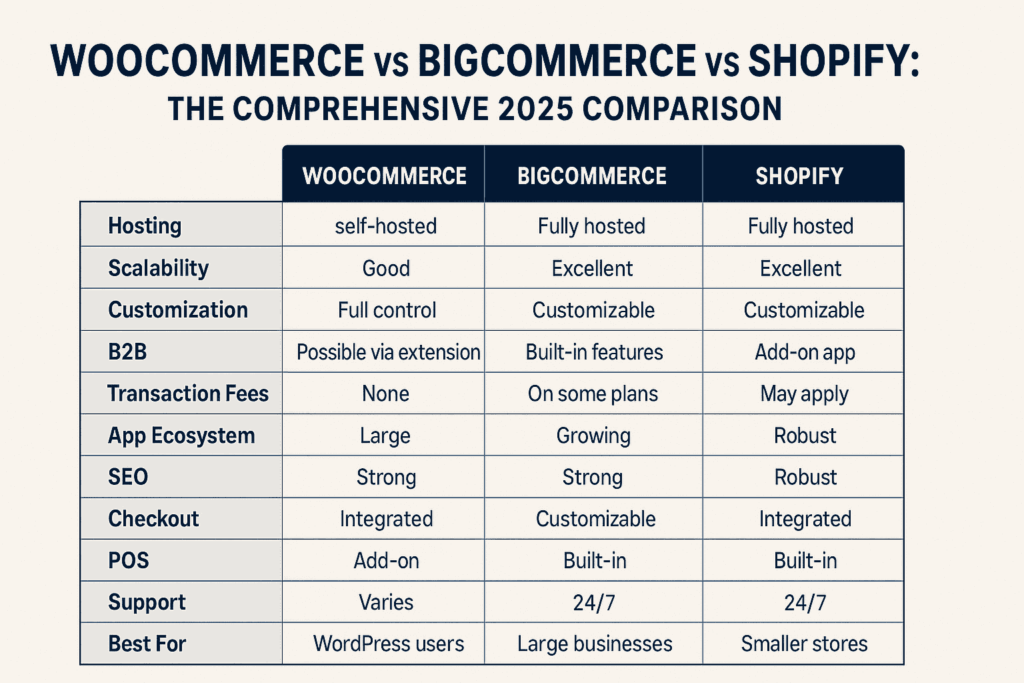
In this article, we will examine three of the most widely used e-commerce platforms today:
- WooCommerce – the WordPress-based open-source plugin
- BigCommerce – a SaaS e-commerce platform aimed at growth and enterprise
- Shopify – the ubiquitous hosted platform for fast start-ups to enterprise
We’ll compare them in depth on: what they are, pricing & cost, hosting & infrastructure, features (catalog, checkout, payments, B2B, headless, multichannel), scalability and performance, SEO & marketing, integrations & ecosystem, support & maintenance; then advantages/disadvantages, typical use-cases, decision guidance, and finally answer frequently asked questions.
Platform Overview – What They Are and Where They Come From
WooCommerce
WooCommerce is a free open-source plugin for WordPress that turns a WordPress site into an online store. Originally launched in 2011 by WooThemes, later acquired by Automattic, it has grown to become a major e-commerce platform. Wikipedia+1 Because it lives within WordPress, it appeals to those who already have content-driven sites, strong WordPress knowledge, or want full control.
Shopify
Shopify is a fully-hosted SaaS e-commerce platform. It handles hosting, security, PCI compliance, and software updates. Merchants sign up, choose a theme, add products, and go live. Over the years, it has grown into a powerful ecosystem with apps, POS, omnichannel, headless support, etc.
BigCommerce
BigCommerce is also a hosted SaaS platform, but with a stronger emphasis on built-in enterprise features, multi-channel, headless commerce, B2B capabilities, and scalability. It aims at merchants who want fewer plugin-assembly, and more out-of-the-box features with fewer third-party dependencies.
Pricing & Cost Comparison
WooCommerce
At first glance, WooCommerce is free — the plugin is free to download and install. But of course, in practice, you will incur multiple costs:
- Hosting (shared, cloud, VPS)
- Domain name
- SSL certificate
- Premium theme (if desired)
- Paid plugins/extensions for extra features (shipping, subscriptions, membership, B2B)
- Payment gateway fees
- Maintenance, backups, security, updates
For example, moderate hosting may cost $120/year or more. Premium themes might cost $30-$100+ per year. Many WooCommerce extensions cost between $30-$300/year. One source estimates that a mid-sized WooCommerce store might need $1,420-6,550 annually, depending on complexity.
In summary: you have freedom and control — you pay for what you need and you choose your infrastructure — but you must budget all those elements.
Shopify
Shopify uses a tiered monthly subscription model. Some recently published numbers show: Basic (around $24/month if billed annually) rising to $299/month for Advanced; the enterprise plan (Shopify Plus) starts from around $2,300/month for larger merchants. Additional costs: if you don’t use Shopify Payments (their built-in gateway) you may incur transaction fees (0.5-2% depending on plan).
BigCommerce
BigCommerce offers tiered plans: Standard $39/month, Plus $105/month, Pro $399/month (less than $400k online sales) per their published pricing. It also uses sales thresholds — if your online sales exceed certain limits, you may need to move into higher tiers. One strong point: BigCommerce does not charge transaction fees regardless of plan when you use an external gateway.
Summary Table (approximate for 2025)
| Platform | Starting Cost | Mid Tier | Advanced / Enterprise | Transaction Fees |
|---|---|---|---|---|
| WooCommerce | Hosting + domain + plugin (~$10-50/month) | $100-$300/month depending on plugins | Highly variable (custom dev, hosting) | Only payment gateway fees (no platform fee) |
| Shopify | ~$24-39/month (entry) | ~$69-299/month | ~$2,000+/month (Plus) | Extra 0.5-2% if not using Shopify Payments |
| BigCommerce | ~$39/month (Standard) | $105/month (Plus) | $399/month+ or custom | No platform transaction fee |
Important nuance
With WooCommerce, you control cost escalation (plugins, hosting) — but you also bear risk (hosting performance, security). With Shopify and BigCommerce, you get predictable subscriptions, but growth in sales can trigger higher costs (either via tier change or via transaction fees). For example, BigCommerce may require an upgrade when sales exceed thresholds. BigCommerce
Hosting, Infrastructure & Performance
WooCommerce
Because WooCommerce is self-hosted (via WordPress), you choose your hosting provider: shared, VPS, cloud, or dedicated. This means you also manage or source support for uptime, caching, security, backups, and updates. Performance will depend heavily on your host, theme, and plugin choices. One article notes that you can start small using shared hosting ($3-$25/month) and scale to cloud hosting $10-$200/month+ depending on traffic. Hostinger, this gives maximum flexibility but also requires technical expertise or a trusted hosting partner.
Shopify
Shopify’s infrastructure is fully managed. Hosting, SSL, backups, security, and scaling are handled by Shopify. That means less operational burden for the merchant. You don’t worry about servers, patching, or traffic peaks (Shopify claims its platform handles large seasonal spikes). Design and theme performance still matter, but hosting is taken care of.
BigCommerce
Like Shopify, BigCommerce is hosted. They promote enterprise-grade infrastructure, unlimited products/bandwidth in many plans, multi-channel capability, API access, and headless commerce readiness. They claim to offer high uptime SLAs (though exact numbers depend on contract). For high-volume merchants, this is attractive because you avoid managing servers and infrastructure yourself.
Real-World Implication
If you are a technical-savvy team or agency managing your own stack and want full control, WooCommerce gives you that. But you accept responsibility for the infrastructure. If you want a “turn-key” solution with minimal server/hosting headaches, Shopify or BigCommerce are better, especially as you scale.
One caveat: while hosted platforms simplify setup, they may impose limits (tier caps, sales thresholds, customizations) that you must understand before you grow. For big traffic volumes and highly custom front-ends (headless), both Shopify and BigCommerce support those, but you’ll likely need higher tiers or enterprise plans.
Features, Scalability & Business Capabilities
Here we examine key functional areas and how well each platform supports them.
Catalog & Product Management
- WooCommerce: Unlimited products (subject to hosting), supports physical and digital products, subscriptions, and memberships via plugins. Because it lives in WordPress, you can leverage content, blog, CMS, and commerce together.
- Shopify: Also unlimited products (in higher tiers) with built-in inventory, variants, multi-channel, themes, and apps. Strong for retail-first models.
- BigCommerce: Similar unlimited product support, with advanced filtering, custom product types, and B2B catalogs built-in in higher plans. For example, it supports price lists, customer groups, and company accounts (in enterprise/plus).
Checkout, Payments & Transaction Handling
- WooCommerce: You choose your payment gateway and host your checkout (via WordPress). There is full control over layout/logic, but security and compliance depend on your stack. You pay gateway transaction fees as applicable (Stripe, PayPal).
- Shopify: Native checkout is excellent; many themes are optimized, and payment options are broad. But if you don’t use Shopify Payments, you pay transaction fees (0.5-2%).
- BigCommerce: One of its strengths is no platform transaction fees regardless of the gateway. Tidio It supports multiple payment gateways and global currencies as part of the core offering.
Multi-channel and Marketplaces
- WooCommerce: Via plugins and extensions, you can connect to marketplaces (Amazon, eBay), social commerce (Facebook, Instagram), and POS integration — but you’ll need to assemble these yourself (or engage developers/agency).
- Shopify: Strong multi-channel support built-in: Facebook/Instagram shops, Amazon channel, POS, mobile apps. Its app ecosystem supports extensions.
- BigCommerce: Also strong in multi-channel and enterprise-grade integrations: marketplaces, global selling, headless commerce support, API-first models. For B2B and enterprise, this is a plus.
B2B / Hybrid (B2C + B2B)
- WooCommerce: With plugins, you can add B2B features (volume pricing, customer groups, company accounts), but you will likely invest in customisation.
- Shopify: To get robust B2B features, you typically need Shopify Plus (enterprise) and additional apps.
- BigCommerce: Offers B2B capabilities more natively — customer groups, price lists, company accounts, custom catalogues — making it a strong option for mixed B2C/B2B commerce.
Headless Commerce / API-First
- WooCommerce: Because it’s open-source, you have full flexibility. Many shops decouple front-end (React, Gatsby) and talk to WooCommerce via REST API.
- Shopify: Offers headless support via Shopify Storefront API, GraphQL, etc. The ecosystem supports custom front-ends and experiences.
- BigCommerce: Also built for headless commerce with API-first, microservices-friendly architecture, multi-storefront support.
Scalability & Enterprise Growth
Scalability is about handling high traffic, large catalogs, many storefronts, integrations (ERP, PIM, OMS), multi-location inventory, and global operations.
- WooCommerce: Can scale very well if hosting/infrastructure is built appropriately, but you bear the cost and complexity.
- Shopify: Very scalable — Shopify Plus is used by large brands, but the cost goes up, and there are still some platform limits (depending on version).
- BigCommerce: Designed for scale; enterprise plans offer unlimited API calls, multi-storefront, global selling, and advanced features. One comparison notes BigCommerce Enterprise pricing starts around $1,000/month for high-volume brands.
Performance & Speed
Performance matters for conversions and SEO. Hosted platforms give you fast infrastructure by default, but your theme and custom code can slow things.
- WooCommerce: Speed depends entirely on hosting, theme, and plugins. Sloppy plugin stacks, poorly optimised hosting will hurt.
- Shopify: Good performance out of the box; their hosting is optimised, and themes are designed for speed.
- BigCommerce: Also emphasises performance; unlimited products/bandwidth in many plans, and focuses on high-volume operations.
SEO, Marketing & Content Strategy
SEO Capabilities
- WooCommerce: Because it is built on WordPress, it inherits WordPress’s strong content and blog capabilities. SEO plugins like Yoast or RankMath allow fine-grained control of metadata, URL structure, schema markup. This makes WooCommerce highly SEO-flexible.
- Shopify: Has good foundational SEO — SSL, mobile responsive, blog support — but some limitations (URL structure, deeper schema customization). Many retailers succeed with Shopify SEO, but if you need ultra-custom SEO strategy you may find some constraints.
- BigCommerce: Has solid SEO tools, including built-in features for structured data, meta tags, and performance. Some users report less flexibility compared to WordPress but better than many hosted solutions.
Marketing, Promotions & Growth Tools
- WooCommerce: You will likely assemble your marketing stack: email marketing plugins, loyalty/subscriptions plugins, affiliate support, etc. It gives you freedom but more overhead.
- Shopify: Extensive app ecosystem for marketing—email, SMS, automation, apps for loyalty, reviews, upsell/cross-sell, and AI tools. Because of its popularity, integration is extensive.
- BigCommerce: Also strong, especially with built-in features for promotions, customer segmentation, advanced analytics, and less reliance on third-party apps compared to some SaaS. For example, abandoned cart recovery may be included in higher plans.
International & Global Selling
- WooCommerce: You need to add extensions for multi-language, multi-currency, global shipping, and localisation.
- Shopify: Has built-in support via Shopify Markets, global storefronts, multi-currency (depending on plan), and many third-party apps.
- BigCommerce: Strong global support built in – multi-currency, multi-language, multi-storefronts, API support, built for larger global brands.
Integrations, Ecosystem & App Marketplace
WooCommerce
Because it’s open-source and part of the WordPress ecosystem, you have access to tens of thousands of WordPress plugins and themes. Need a custom workflow? You can code or hire developers. Need a CRM/ERP integration? You’ll find plugins or build custom. But you also have to manage plugin compatibility, updates, and security.
Shopify
Shopify has one of the largest app ecosystems in e-commerce: thousands of apps for payments, logistics, subscriptions, reviews, marketing, and POS. The upside: you can use built in many built-in features quickly. The trade-off: cost of apps, reliance on third-party vendor.
BigCommerce
BigCommerce has its own app marketplace, but arguably less ‘app-heavy’ because many features are built in. For enterprise and B2B merchants, this is often an advantage (less plugin/extension complexity). Also, BigCommerce emphasises API-first and headless integration, making it attractive for larger stacks (ERP, PIM, OMS).
Support & Maintenance, Security & Compliance
WooCommerce
Since you’re self-hosting (unless you use managed WordPress hosting), you’re responsible for installing updates (WordPress core, theme, WooCommerce plugin, extensions), performing backups, managing performance and securing your site (SSL, firewalls, malware scanning). If you customise heavily or integrate with backend systems, you will also manage version conflicts and plugin compatibility.
Support is community-driven unless you’ve bought premium extensions, which include support. One “hidden cost” of WooCommerce is running into plugin conflicts or needing developer time when growth hits.
Shopify
Because it’s a managed environment, many of those infrastructural responsibilities are handled by Shopify. You get 24/7 support (chat, email, phone, depending on plan) and you don’t worry about server patches, core updates, or PCI compliance (Shopify is PCI-compliant for you). Still, you manage your theme, apps, and custom logic.
BigCommerce
Similarly, BigCommerce handles hosting infrastructure, security, a performant stack, and server maintenance. Support varies by plan: higher tiers get dedicated account management, priority support. For enterprise-grade stores, this is a strong benefit.
Advantages & Disadvantages
WooCommerce (Pros)
- Full control over all aspects of your store: hosting, code, theme, database, and integrations.
- Seamless integration with WordPress content and blog — excellent for content-driven commerce, hybrid sites.
- Potentially lower platform fees (you don’t pay a “platform subscription” beyond hosting) — you pay only what you choose.
- Strong flexibility: you can build exactly what you need, customise heavily.
WooCommerce (Cons)
- You bear more responsibility: hosting, maintenance, updates, security, and backups.
- Cost can scale unpredictably (if you add many premium extensions or custom dev).
- If you’re not technical, you may need to hire help or be reliant on third-party plugins whose update cycle may differ.
- Growth demands (high traffic, many SKUs, integrations) may require higher-end hosting and more sophisticated architecture, which increases cost and complexity.
Shopify (Pros)
- Very fast to launch and very user-friendly — ideal for merchants who want to focus on selling rather than infrastructure.
- Large app ecosystem, many plug-and-play integrations.
- Hosting, security, and compliance are all handled.
- Good scalability for many merchants; many successful brands use it.
Shopify (Cons)
- Less flexibility than open-source: you are working within Shopify’s architecture. Deep customisations (especially outside of standard use-cases) may require Shopify Plus (higher cost) or custom dev.
- Transaction fees if you don’t use Shopify Payments — this can add cost especially if you already have another gateway you prefer.
- Growth may trigger higher tiers rapidly; you may hit cost escalation.
- Certain SEO/custom URL structures or deep customisation can be more constrained compared to open-source.
BigCommerce (Pros)
- Built for growth and scale: many enterprise-level features are built in rather than always via add-ons.
- No platform transaction fees (when you use external gateways) – advantageous for high sales volume.
- Strong B2B features natively, good global selling support, and headless readiness.
- Hosted infrastructure means less server overhead for the merchant.
BigCommerce (Cons)
- While easier than building from scratch, it still may have steeper learning/implementation if you plan headless, multi-storefront, or heavy customisation.
- Growth may trigger plan jumps: sales thresholds or features may require an upgrade.
- Themes or design flexibility may feel less forgiving than fully custom open-source stacks (depending on the merchant’s needs).
Typical Use-Cases & Which Platform Suits What
Here are typical business types and which platform might suit them best — of course, context matters.
- Small to Medium Retail Brand (D2C) starting: Wants to launch quickly, minimal technical overhead, plug-and-play. Shopify is often the best choice here.
- Content-Driven Business / Blog + Merchandise + Memberships: Already using WordPress for content, wanting full flexibility, custom workflows. WooCommerce is strong here.
- Mid-Size to Large Brand, B2B + B2C, Multi-Channel, Global Sales, Strong Back-Office Integration: BigCommerce often excels because of built-in scale features and better enterprise fit without requiring you to build everything from scratch.
- Agency or Developer-Driven Build with Unique Requirements: WooCommerce gives maximum flexibility; BigCommerce also for enterprise headless; Shopify Plus if the brand is committed to the Shopify ecosystem.
- Brand that expects very rapid growth, many SKUs, multiple storefronts, heavy integrations (ERP, PIM, OMS): BigCommerce (enterprise) or Shopify Plus will likely be best, but be aware of cost and architecture.
- Brands that want to own everything (infrastructure, data, custom logic) and avoid platform lock-in: WooCommerce is the safest for ownership.
Migration & Switching Considerations
When thinking about switching platforms (say from a legacy system to one of these) or choosing one for the long term, consider:
- Data migration: product catalog, customer database, order history. How easy is export/import?
- Integrations: ERP, PIM, CRM, shipping, logistics. Which platforms support your connectors or do you need custom dev?
- Custom theme/design: if you have a heavily customised site, how will theme logic translate?
- SEO & URLs: changing platform can impact URLs, links, metadata — risk of SEO drop.
- Hosting & infrastructure: for WooCommerce, you may need to select hosting and scale accordingly; for SaaS less so.
- Cost of change and cost of ownership: switching later can be costly, so the initial decision should consider a 2-5 year horizon.
- Upside and adoption of new features: platform development roadmap, app ecosystem health.
- Operational team skillset: Do you have WordPress developers (for WooCommerce)? Or do you prefer a managed SaaS environment?
- Growth trajectory and flexibility: What happens when you grow fast — will you outgrow plan caps, face higher fees, need custom builds?
Frequently Asked Questions
Q1: Is WooCommerce really free?
Yes — the base WooCommerce plugin is free. Elementor, but running a professional store requires hosting, a domain, SSL, themes, extensions, and maybe developer support. The actual cost depends on your store’s complexity.
Q2: Which platform handles high traffic and large-scale better?
All three can handle scale, but the effort differs. WooCommerce can scale if you invest in good infrastructure; Shopify Plus and BigCommerce Enterprise are built for high scale with managed infrastructure. BigCommerce enterprise includes unlimited API calls, multi-storefronts, and global selling.
Q3: Which is best for SEO?
If you want maximum SEO flexibility, WooCommerce (on WordPress) leads. BigCommerce has very good SEO capability, too. Shopify is fine, but you may bump into constraints around URL structure or deep schema markup if you are highly sophisticated.
Q4: What about transaction fees?
BigCommerce stands out because it does not charge platform transaction fees (you pay only payment gateway fees) when you use third-party gateways. Shopify charges extra if you don’t use Shopify Payments. WooCommerce depends on the gateway you choose.
Q5: What about B2B features?
BigCommerce has strong native B2B capability (customer groups, price lists, company accounts). Shopify offers B2B in Shopify Plus or via apps. WooCommerce can support B2B but will require plugins/customization.
Q6: What if I already use WordPress and content marketing heavily?
Then WooCommerce is a natural fit because you already have the WordPress ecosystem. But you still need to think about hosting, performance, and the upgrade path.
Q7: Can I switch later? What are the costs?
Yes, you can, but migrations cost time and money — migrating product data, customers, URLs, integrations, and design. It’s smarter to pick a platform with a 2-5 year horizon in mind and build around growth.
Final Thoughts: Which Platform Should You Choose?
After two decades in digital commerce, I’ll distil this down to what I ask clients when advising them:
- What is your business model today and in 3-5 years?
- How much customization vs standard process do you need?
- How much technical discipline/infrastructure do you want to manage vs offload?
- What is your budget, not just for launch but for scale, support, and future maintenance?
- How important is content (blog, editorial, brand story) vs pure transactional commerce?
- What integrations (ERP, CRM, PIM, marketplaces) and global requirements do you have?
- What team skillset do you already have (WordPress dev, front-end dev, integrations team)?
- What are your speed-to-market and long-term ownership goals?
Here’s how I summarise:
- Choose WooCommerce if you value supreme flexibility, own your infrastructure, integrate content heavily, already use WordPress, and have developer capacity. You’ll pay more in operational overhead, but you’ll own your stack and can shape it exactly.
- Choose Shopify if you want a fast start, minimal infrastructure management, a large app marketplace, and you are comfortable working within a hosted SaaS framework. Particularly good for D2C retail brands.
- Choose BigCommerce if you anticipate significant growth, require enterprise features, a B2B/B2C mix, multi-channel/global operations, and want a hosted environment with strong built-in capabilities and lower friction for large-scale.
No platform is “one size fits all”. The right choice depends on your business, not just the platform. It’s better to choose a platform that supports your growth path and integrates with your ecosystem rather than chasing buzz or the lowest cost only.
At Intelligize Digital, we guide businesses through this decision with a holistic view—covering strategy, architecture, cost modelling, and integrations—so that the platform you adopt becomes a growth engine, not a bottleneck.