

How we run a GA4 setup
We are a remote-first team based in Delhi, India. Every project starts with a free 30-minute audit.
- Price
- Fixed in the quote after a tracking audit
- Timeline
- Agreed in the quote, before work starts
- You keep
- The tracking plan and the Tag Manager container
- After launch
- Reporting in Looker Studio
Tracking problems we fix
These are the common ones. Each looks harmless in Tag Manager and damages the numbers you decide on.
Purchases counted twice
A customer reloads the order confirmation page or opens it again from an email, and GA4 records the order a second time. Send transaction_id with every purchase so GA4 can de-duplicate, and fire from the platform’s order event rather than a page view where possible.
add_to_cart fires on click, not on success
The tag fires when the button is pressed, even if the item was out of stock or the request failed. Trigger from the cart response or the platform’s customer event, so only real additions count.
Payment gateways stealing credit
Shoppers come back from PayPal or a card security page, and GA4 starts a new session credited to the gateway. List those domains as unwanted referrals in GA4 and test that the checkout keeps the original session.
UTM tags on internal links
A homepage banner tagged utm_source=homepage resets the visitor’s real source, so the ad that brought them gets no credit. Use UTMs only on links from outside the site. Track internal promotions with events instead.
Two GA4 tags on one site
A plugin adds GA4 and someone also added it in Tag Manager, so every page view and purchase counts twice. One source for each tag, written into the tracking plan and checked with Tag Assistant.
A banner that doesn’t talk to the tags
The banner looks right, but tags fire before a choice is made, or never update after one. Set consent defaults before any tag loads, update on every choice, and verify per region.
From audit to hand-over in five steps
The same order on every project. Your dates are set in the quote.
- Step 01
Audit
We hold a free 30-minute call about what you have today and what is going wrong.
- Step 02
Quote
You get a fixed scope, price and dates in writing.
- Step 03
Build
We build in your own accounts and show you progress each week.
- Step 04
Test
We check changes on a staging copy or a test set-up before they go live.
- Step 05
Hand over
You get documentation and a walkthrough for your team.
What we need from you
Access to GA4, Tag Manager and the store admin, and a list of the reports you make decisions from.
A GA4 setup, written down before anything is tagged
Every event has a name, a trigger, its parameters and where it is sent. The plan lives with your team, so the next developer does not guess. This is an excerpt for a typical store.
| Event | Fires when | Parameters | Sent to |
|---|---|---|---|
| Browse | |||
view_item_list | Collection or search results shown | item_list_id, items[] | GA4 |
select_item | Product card clicked | item_list_id, items[0] | GA4 |
view_item | Product page viewed | currency, value, items[] | GA4, Ads, Meta |
| Cart | |||
add_to_cart | Add to cart succeeds (not on click) | currency, value, items[] | GA4, Ads, Meta |
view_cart | Cart drawer or page opened | currency, value, items[] | GA4 |
remove_from_cart | Line removed | currency, value, items[] | GA4 |
| Checkout | |||
begin_checkout | Checkout started | currency, value, coupon, items[] | GA4, Ads, Meta |
add_shipping_info | Shipping method chosen | shipping_tier, value | GA4 |
add_payment_info | Payment step completed | payment_type, value | GA4 |
| Purchase | |||
purchase | Order confirmed, sent once | transaction_id, value, tax, shipping, items[] | GA4, Ads, Meta |
refund | Refund issued in the store | transaction_id, value | GA4 (server) |
generate_lead | Quote or trade form sent | form_id, value | GA4, Ads |
Swipe the table sideways to see every column.
Event names follow GA4’s recommended ecommerce events.
Basic, advanced or none: what each consent setup means
Consent mode v2 is how your cookie banner tells Google’s tags what a visitor agreed to. How it’s implemented changes what you can still measure. These are the trade-offs; your legal adviser decides what’s right for your markets.
No consent mode
Tags fire, or are blocked, without passing any consent state.
- When a visitor declines
- Either nothing is measured, or tags fire anyway, which is a compliance problem
- Modelling
- None
- Advertising
- Google requires consent mode for personalised ads and remarketing to users in the EEA and UK, so audiences and conversions suffer
- Our view
- Not an option for stores advertising to European or UK visitors
Basic
Google tags wait until the visitor makes a choice.
- When a visitor declines
- No data is sent to Google at all
- Modelling
- A general model fills some gaps, with less detail
- Advertising
- Meets the requirement, with less data to work with
- Our view
- A good fit when your legal advice says nothing may load before consent
Advanced
Tags load straight away, with consent denied by default.
- When a visitor declines
- Cookieless pings are sent, without identifiers
- Modelling
- Advertiser-specific modelling once there’s enough data
- Advertising
- Meets the requirement and keeps more measurement
- Our view
- Usually the better choice for stores, if your legal advice allows it
Work related to this service
A few projects close to this kind of work: what was needed and what we built.

Hugo and Stacy dance courses
A store for dancers Hugo and Stacy, selling digital download dance courses with payment and instant download, hosted on AWS.
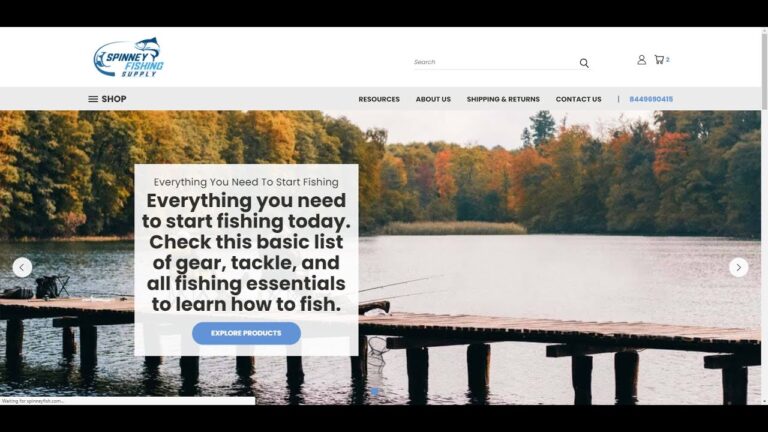
Spinney Fishing Supply on BigCommerce
A BigCommerce store for Spinney Fishing Supply, which sells fishing and boating supplies to beginners, hobbyists and professional anglers.

Vproteomics website redesign
A WordPress redesign for Vproteomics, a proteomics services company, built around its discovery and targeted proteomics services.
Ecommerce by industry
Each industry has its own stock, pricing and delivery rules. Pick yours to see the common problems and what we build.
- B2B wholesale and distributionTrade pricing, quotes, bulk orders→
- Health and beautySubscriptions and repeat orders→
- Home and furnitureLarge catalogues, delivery slots→
- Food and beverageFresh stock and fast fulfilment→
- Industrial and manufacturingParts catalogues tied to the ERP→
- Fashion and apparelSizes, variants and returns→
- Electronics and technologySpecs, bundles and warranties→
- Not listed?Tell us your industry→
About analytics and tracking
Anything else, ask on the audit call.
Not answered here? Ask on the free 30-minute audit call.
Book a free auditDo we still need Universal Analytics?
No. Universal Analytics stopped processing data in 2023 and GA4 is Google’s analytics product now. If your GA4 setup was a quick migration, it is worth an audit: many skip ecommerce events or count purchases twice.
What is consent mode v2?
A way for your consent banner to tell Google tags what each visitor agreed to. Since March 2024 Google requires it for advertisers using personalised ads or remarketing with users in the EEA. When consent is declined, tags send cookieless signals that Google can use for modelling.
What does server-side tagging change?
Tags send data to a tagging server on your own subdomain, which then forwards it to GA4, ad platforms and others. You control what is shared, pages load less third-party script and some data loss from browser restrictions is reduced. It still needs consent.
Why does GA4 revenue not match Shopify?
Usually a mix of duplicate or missing purchase events, refunds not sent, currency settings, ad blockers and declined consent. We reconcile against your store orders and fix the parts that can be fixed, then document the expected gap.
Can you set up tracking on WooCommerce and BigCommerce too?
Yes: Shopify, BigCommerce, WooCommerce, Adobe Commerce and headless stores, using each platform’s own customer events or data layer where it has one.
How close should GA4 revenue be to our store revenue?
It will never match exactly: declined consent, ad blockers and refunds all open a gap. A well-configured store sees a small, stable difference. What matters is that the gap is explained and doesn’t jump around from week to week.
Do we need server-side tagging?
Not always. It’s worth it when you run several ad platforms, care about page speed or want tighter control over what each vendor receives. It adds hosting cost and upkeep, so for smaller stores a clean browser-side setup is often enough.
Who owns the GA4 property and Tag Manager container?
You do. We work as users on your accounts and never create properties under our own. If we ever part ways, nothing needs migrating.
Is GA4 compliant with GDPR?
That depends on how it’s configured and on your legal basis, not on the tool alone. We set up consent, data retention and data-sharing settings to match your legal advice, but we don’t give legal advice ourselves.
Certifications and partner programmes
Intelligize Digital is a registered partner of these platforms and hosts.
 ShopifyShopify Partner
 BigCommerceBigCommerce Partner
 WP EngineWP Engine partner
 AutomatticAutomattic for Agencies
- NNexcessNexcess partner
 HostingerHostinger partner
 BigCommerce Certified
 BigCommerce Certified
 Liquid Storefronts for Theme DevelopersShopify Certified
 Headless at Shopify for DevelopersShopify Certified
 Shopify FoundationsShopify Certified
Which number do you
not quite believe?
Tell us the report you trust least. We will compare it with your store data and show you where the gap comes from on a 30-minute call.
What happens next
- An engineer replies Within one business day, by email.
- A free 30-minute audit On a call with an engineer.
- A fixed quote It follows the audit. Nothing is billed before you agree it.